
How IFTA Tax Calculations Work
IFTA calculations look complicated, but they follow a simple formula. Here's how it works, a worked example, and what you need to get it right.
Last updated: 9 min readBy OverTheRoad.AI Team
The IFTA formula at a glance
| Step 1: Fleet MPG | Total miles ÷ Total gallons (across all states) |
|---|---|
| Step 2: Taxable gallons per state | State miles ÷ Fleet MPG |
| Step 3: Net tax per state | (Taxable gallons – Purchased gallons in that state) × State tax rate |
| Step 4: Surcharge (KY, VA only) | Taxable gallons × Surcharge rate (no offset for purchases) |
| Step 5: Final result | Sum of net tax + surcharges across every IFTA state you ran |
| Common mistake | Using rate-con miles instead of actual driven miles. Off by 5-10% almost every time. |
The Core Formula
IFTA calculates how much fuel tax you owe (or are owed) in each state. The formula has three parts:
1. Overall MPG = Total Miles ÷ Total Gallons
2. Taxable Gallons per State = State Miles ÷ Overall MPG
3. Net Tax = (Taxable Gallons − Gallons Purchased in State) × State Tax Rate
If the result is positive, you owe tax to that state. If negative, that state owes you a credit.
What You Need to Calculate IFTA
- Total miles driven — across all jurisdictions for the quarter
- Miles per state — broken down by each IFTA jurisdiction you entered
- Total gallons purchased — all fuel bought during the quarter
- Gallons per state — where each fuel purchase was made (state of the pump, not where you burned it)
- Current tax rates — each state sets its own fuel tax rate, updated quarterly
Pro Tip
Your Samsara ELD tracks miles by state. A major fleet fuel card (EFS, Comdata, and similar) tracks gallons by state. With both connected to OverTheRoad.AI, all five inputs are collected automatically.
Worked Example
Say you drove 30,000 miles and bought 5,000 gallons in Q1:
- Overall MPG: 30,000 ÷ 5,000 = 6.0 MPG
- Texas: 8,000 miles ÷ 6.0 = 1,333 taxable gallons. You bought 1,500 gallons in TX. Credit of 167 gallons × TX rate.
- Oklahoma: 4,000 miles ÷ 6.0 = 667 taxable gallons. You bought 200 gallons in OK. Owe tax on 467 gallons × OK rate.
- Illinois: 3,000 miles ÷ 6.0 = 500 taxable gallons. You bought 0 gallons in IL. Owe full tax on 500 gallons × IL rate.
The net across all states is what you owe (or are refunded) for the quarter. States where you fueled heavily give you credits; states you drove through without fueling generate tax bills.
Where Tax Rates Come From
Each IFTA jurisdiction publishes tax rates quarterly. Rates include a base rate plus surcharges (like environmental or underground storage tank fees). Rates change — so using last quarter's rates will produce incorrect results.
For reference, diesel tax rates range from about $0.12/gallon (Oklahoma) to $0.65+/gallon (Pennsylvania, California). The spread matters: driving through high-tax states without fueling there creates a larger tax bill.
Common Errors That Change Your Tax Bill
- Wrong MPG: Even a 0.5 MPG error cascades across every state. If you calculate 6.5 instead of 6.0, every state's taxable gallons changes.
- Fuel in the wrong state: Assigning a purchase to the wrong jurisdiction shifts credits. Fuel is taxed where you pumped it, not where you used it.
- Deadhead miles: Empty miles still count toward state mileage totals. Skipping them underreports miles and increases your apparent MPG — which reduces taxable gallons and could trigger an audit adjustment.
- Toll bypass miles: Transponder data may not match actual miles driven. Use ELD data, not toll records, for mileage.
- Mixing diesel types: Reefer fuel and regular diesel are reported separately in some jurisdictions.
How OverTheRoad.AI handles this
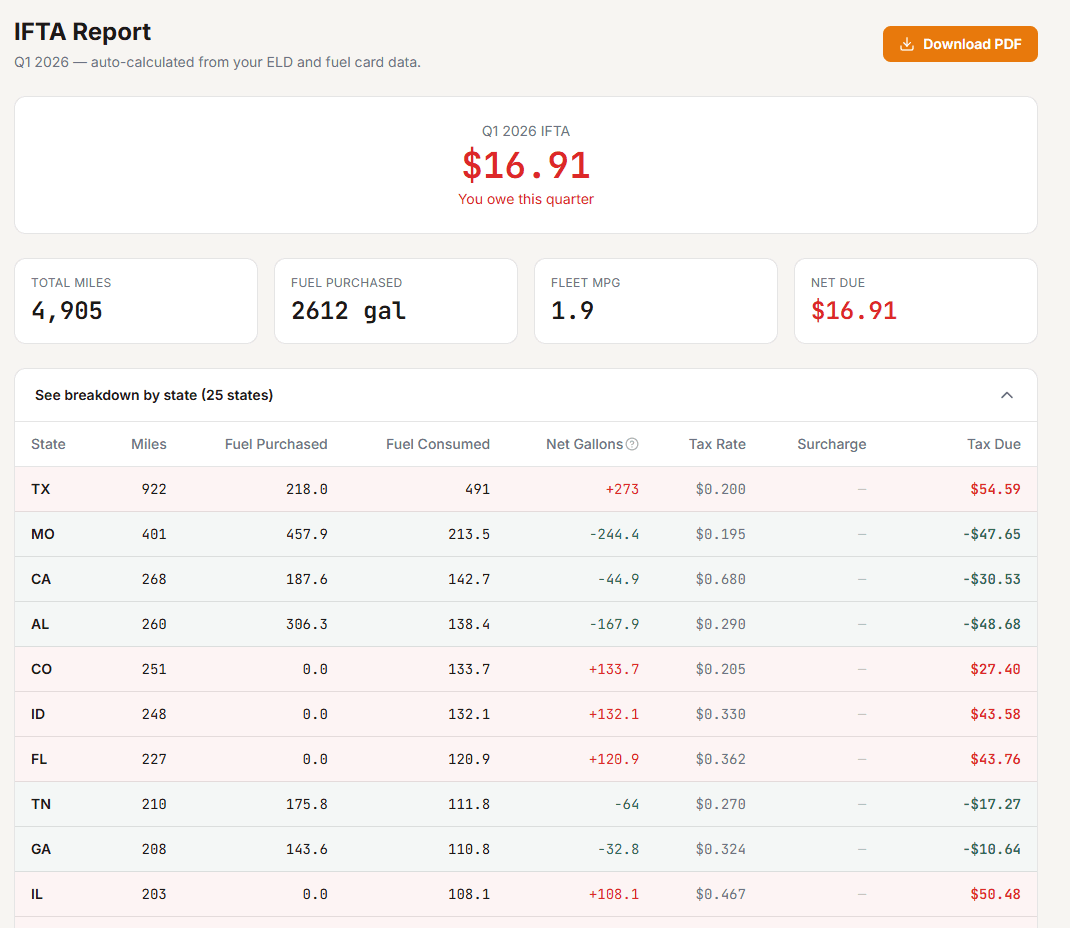
IFTA calculated automatically from your existing data
- Miles by state pulled from your loads and Samsara ELD
- Fuel purchases imported from major fleet cards (EFS, Comdata, and others) by state
- Current quarterly tax rates applied automatically — never stale
- One-click PDF export ready for your base state filing
Related Guides
Want your real cost per mile in 3 minutes?
Drop a settlement or rate con — our free analyzer pulls CPM, RPM, broker margin, and IFTA prep.
State-by-state IFTA guides