IFTA Filing Guide for Owner-Operators
The International Fuel Tax Agreement (IFTA) requires interstate carriers to file quarterly fuel tax returns. This guide covers everything you need to know — deadlines, calculations, common mistakes, and how to avoid penalties that eat into your bottom line.
Last updated: 12 min readBy OverTheRoad.AI Team
IFTA filing deadlines and penalties
| Q1 (Jan–Mar) due | April 30 |
|---|---|
| Q2 (Apr–Jun) due | July 31 |
| Q3 (Jul–Sep) due | October 31 |
| Q4 (Oct–Dec) due | January 31 of the following year |
| Late penalty | $50 or 10% of net tax due, whichever is greater (per filing, not per state) |
| Interest | Accrues per-jurisdiction on unpaid tax until paid |
| License revocation risk | After 2 consecutive missed filings |
| Record retention | 4 years minimum |
| Surcharge states | Kentucky, Virginia (KY, VA) |
| Non-IFTA jurisdictions | Oregon (weight-mile tax), Alaska, Hawaii, DC |
What Is IFTA?
IFTA is a tax agreement between the 48 contiguous U.S. states and 10 Canadian provinces. It simplifies fuel tax reporting for carriers operating across state lines. Instead of filing with every state you drive through, you file one quarterly return with your base jurisdiction — and they distribute the taxes to each state based on the miles you drove there.
Think of it as a clearinghouse: you pay one state, and that state settles up with all the others on your behalf. Without IFTA, you'd need fuel permits for every single state you enter.
Who Needs to File IFTA?
You need an IFTA license if your vehicle has two axles and a gross vehicle weight over 26,000 lbs, has three or more axles regardless of weight, or is used in combination when the combined weight exceeds 26,000 lbs — and you operate in two or more IFTA jurisdictions.
If you only operate within a single state, you don't need an IFTA license. But the moment you cross a state line with a qualifying vehicle and load, you're required to have one.
Pro Tip
Apply for your IFTA license through your base state's DMV or motor carrier division before your first interstate load. Most states process applications in 1-2 weeks. You'll get a license and two decals per qualified vehicle.
IFTA Filing Deadlines
IFTA returns are due quarterly, 30 days after the end of each quarter:
- Q1 (Jan–Mar): Due April 30
- Q2 (Apr–Jun): Due July 31
- Q3 (Jul–Sep): Due October 31
- Q4 (Oct–Dec): Due January 31 of the following year
Late filings incur a $50 penalty or 10% of the net tax liability — whichever is greater — plus interest on unpaid amounts. Even if you owe $0 for the quarter, filing late still triggers the $50 minimum penalty.
If you miss two consecutive filings, your IFTA license can be revoked — which means you can't legally operate interstate until you reinstate it.
How IFTA Tax Is Calculated
The basic formula for each jurisdiction is:
You get credit for fuel purchased in each state. If you bought more fuel than your tax liability in a state, you get a refund. If you drove through a state but didn't buy fuel there, you owe tax.
Worked Example
Quick version: drive 30,000 miles on 5,000 gallons (6.0 MPG), and Texas's 8,000 miles work out to 1,333 taxable gallons — so buying 1,500 gallons in TX earns a credit, while a state you drove through without fueling generates a tax bill. For the full state-by-state walk-through, see How IFTA Tax Calculations Work.
Pro Tip
Your ELD (like Samsara) tracks miles by state automatically. A major fleet fuel card (EFS, Comdata, and similar) logs gallons by state. With both connected, the IFTA calculation can be largely automated.
What Records You Need to Keep
IFTA audits happen. When they do, you need at least 4 years of records:
- Distance records: Trip sheets, ELD reports, or GPS data showing miles per state
- Fuel receipts: Every fuel purchase with date, location, gallons, and amount paid. Digital copies are accepted.
- Unit information: Vehicle identification, fleet number, and which vehicle made each trip
- Monthly/quarterly summaries: Total miles and total gallons per jurisdiction
If you can't produce records during an audit, the jurisdiction will estimate your tax liability — and their estimates are never in your favor.
Common IFTA Mistakes
- Mixing up gallons and miles by state. Your ELD tracks miles, but fuel receipts must be categorized by the state where you fueled — not the state where you used it.
- Missing the deadline. Even if you owe $0, you must file. A zero return filed late still triggers a penalty.
- Not keeping receipts. You need fuel receipts for at least 4 years. A shoebox of crumpled receipts won't cut it in an audit.
- Incorrect MPG calculation. Your overall miles per gallon drives how tax is allocated. An error here cascades across every state.
- Forgetting deadhead miles. Empty miles count toward your total and state mileage. Don't skip them.
- Using last quarter's tax rates. IFTA rates can change quarterly. Using stale rates will produce incorrect results.
The Quarterly IFTA Workflow
Here's what IFTA prep looks like for a typical owner-operator without automation:
- Export trip data from your ELD and calculate miles per state
- Gather and sort all fuel receipts by state
- Calculate total miles, total gallons, and overall MPG
- Look up current tax rates for every state you entered
- Calculate taxable gallons, credits, and net tax for each jurisdiction
- Fill out the IFTA return form
- Submit and pay (or receive credit)
This process typically takes 4-6 hours per quarter for a solo owner-operator doing it manually. For small fleets with multiple trucks, multiply that.
Without OverTheRoad.AI
- Export ELD data, calculate miles per state manually
- Sort fuel receipts by state from a pile of paper
- Look up current tax rates for 8-15 states
- Build a spreadsheet and hope the formulas are right
- 4-6 hours per quarter — or pay someone $300-500 to do it
With OverTheRoad.AI
- Miles pulled automatically from your loads
- Fuel purchases imported from your fuel card
- Current tax rates applied automatically each quarter
- One-click IFTA PDF export, ready to file
- Done in under 5 minutes — can save the $300-500 you'd otherwise pay a filing service
How OverTheRoad.AI handles this
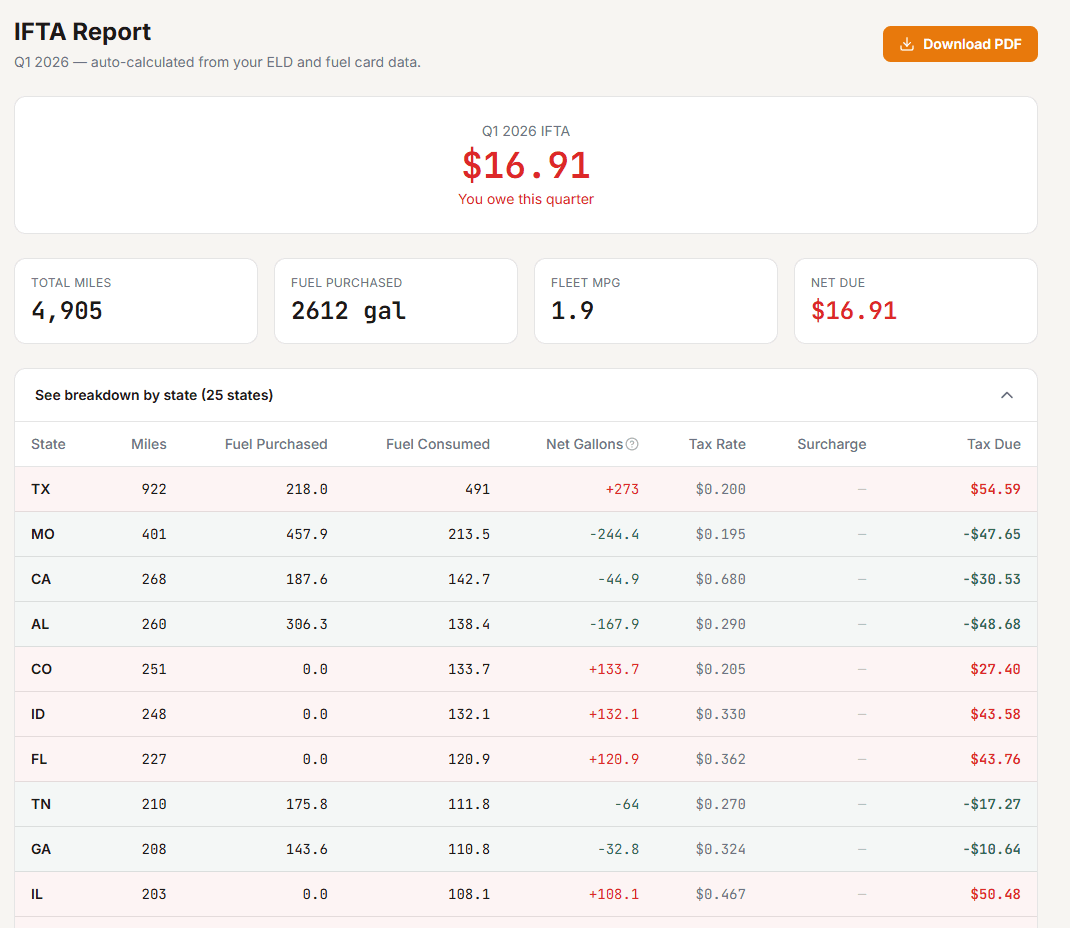
IFTA auto-calculated, every quarter
- Pulls miles by state from your loads and Samsara ELD
- Imports fuel purchases by state from major fleet cards (EFS, Comdata, and others)
- Applies current quarterly tax rates automatically
- Generates a filing-ready PDF with one click
Related Guides
Want your real cost per mile in 3 minutes?
Drop a settlement or rate con — our free analyzer pulls CPM, RPM, broker margin, and IFTA prep.
State-specific IFTA guides
Each state's quirks: the surcharge states, the non-IFTA jurisdictions, and the additional filings (NY HUT, KY KYU, NM WDT, OR Weight-Mile, CT HUF) most carriers miss.