Trucking Software vs Spreadsheets
A spreadsheet is free and familiar. But at some point, it starts costing you more than it saves. Here's how to tell when you've hit that point.
Last updated: 11 min readBy OverTheRoad.AI Team
When Spreadsheets Work
Spreadsheets are fine when:
- You run 1-3 loads per week
- You only operate in 1-2 states (minimal IFTA complexity)
- You have time to update it consistently
- You don't need real-time cash flow visibility
- You're comfortable building and maintaining formulas
If this describes you, a well-built spreadsheet can work for a while.
When Spreadsheets Break Down
Spreadsheets start failing when:
- IFTA gets complex: 5+ states means 5+ rows of calculations per quarter. One wrong cell and your filing is off.
- You forget to update it: Skip a week and you're reconstructing data from memory and receipts.
- Formulas break: Someone (probably you at 11 PM) accidentally overwrites a formula. Now every downstream number is wrong.
- You can't scan documents into it: Your rate cons, BOLs, and receipts live in a separate folder (or your phone photos).
- No alerts: A spreadsheet won't alert you when your medical card expires in 30 days.
- Tax time is painful: Your CPA needs categorized data, not a raw spreadsheet with 12 tabs.
What You Gain With Trucking Software
| Capability | OverTheRoad.AI | Spreadsheet |
|---|---|---|
| IFTA auto-calculation | Automatic | Manual formulas |
| Document scanning | Camera → filed | Not possible |
| Invoice generation | One tap | Manual PDF |
| Compliance reminders | Built-in calendar | None |
| Cash flow projection | 14-day forecast | Manual |
| Fuel card import | CSV import | Copy-paste |
| ELD integration | Connected | Not possible |
| Works from phone | Full app | Barely usable |
The Real Cost of Spreadsheets
A spreadsheet is free in dollars. But if you spend 2-3 hours a week maintaining it, that's 100-150 hours per year. If your time is worth even $25-50/hour, that's real money you're spending on data entry instead of driving.
Factor in the risk of a missed IFTA deadline (penalty of $50 or 10% of tax due, whichever is greater), a compliance lapse (out-of-service order), or a lost invoice (delayed payment for 30+ days) — and the "free" spreadsheet gets expensive fast.
Making the Switch
OverTheRoad.AI is designed for owner-operators who have outgrown spreadsheets but don't want enterprise complexity. Connect your ELD, import your data, and you're running in about 30 minutes. Your existing data doesn't disappear — OverTheRoad.AI has import tools for loads, expenses, fuel, and compliance items.
Specific Failure Modes: Where Spreadsheets Break First
Every owner-operator who moves off spreadsheets can point to the exact moment it stopped working. The failure is never a single event — it's the fifth time a small thing went wrong and the cost became visible.
- The IFTA formula collapse. You built a per-state sheet two quarters ago that worked fine. Then you hit 6 states one quarter, copy-pasted a row, and the
SUMIFreference shifted. The net tax figure looks plausible, but it's wrong by $200 — and you won't find out until the audit letter arrives 18 months later. - Tab sprawl. Week 1 you have three tabs: loads, fuel, expenses. Month 6 you have 17: loads-2025, loads-2026, fuel-EFS, fuel-cash, expenses, expenses-truck, expenses-trailer, compliance-raw, compliance-summary, invoice-log, broker-contacts, repairs, per-diem, mileage-raw, mileage-by-state, taxes-2025, and a hidden one called "DO NOT DELETE." Finding last month's data takes 10 minutes.
- The hero formula that only you understand. A 40-character
INDEX(MATCH())that calculates revenue per mile by broker. When it breaks, you either fix it at 11 PM or just stop looking at that number — which means you stop knowing which brokers actually pay. - Phone access. Google Sheets on mobile is usable for viewing but miserable for data entry. After the third time you try to log a fuel receipt at a truck stop at 6 AM with greasy hands, the receipts start piling up in the cup holder.
- Compliance deadlines disappear. An expiration date in column F of a sheet you open once a month is not a reminder system. The first time your medical card lapses because "I was going to check the sheet this weekend" is when you learn that lesson.
- Multi-device drift. Your laptop has a version. Your phone has a different version. Your CPA has a third version you emailed in January. When they disagree, nobody knows which is right.
Migration Checklist: Spreadsheets → OverTheRoad.AI
The migration takes about 30 minutes if you have your data handy. It breaks into six steps:
- 1. Export your loads as CSV. Include load number, broker, origin, destination, pickup date, delivery date, and rate. OverTheRoad.AI imports these directly — don't worry about matching column names exactly; the importer maps them.
- 2. Import your fuel-card transactions. Major fleet cards (EFS, Comdata, and similar) export a CSV of your transactions that imports into OverTheRoad.AI. Once your transactions are in, you don't need to migrate your fuel spreadsheet at all — OverTheRoad.AI rebuilds it from the imported data.
- 3. Connect your Samsara ELD. Same read-only pattern. Miles by state, trip logs, and vehicle data sync. This alone eliminates your per-state mileage spreadsheet.
- 4. Upload compliance docs. Take photos of your CDL, medical card, insurance certificate, and DOT inspection sticker. OverTheRoad.AI reads the expiration dates and surfaces renewal reminders as each date approaches. That replaces your compliance tab.
- 5. Import your broker contacts. A simple CSV with broker name, MC#, email, and phone. OverTheRoad.AI pulls payment history from the imported loads and starts tracking pay speed automatically.
- 6. Archive the spreadsheet, don't delete it. Zip it up, drop it in a cloud folder labeled "spreadsheet-archive," and leave it alone. You'll never open it, but knowing it's there makes the switch feel reversible — which is the point.
Pro Tip
Don't try to migrate everything perfectly on day one. Get loads and fuel in first; those cover 80% of daily use. Compliance docs, broker contacts, and old invoices can be added over the first week without blocking anything.
What You Give Up (Honestly)
A good guide says what you lose, not just what you gain. Moving from spreadsheets to OverTheRoad.AI means giving up:
- Full control over every cell. If you love custom formulas and column widths, software feels opinionated. OverTheRoad.AI has the categories owner-operators actually need, but you can't add a column called "Mood" to your load log.
- Zero monthly cost. A spreadsheet is free; OverTheRoad.AI isn't. The question is whether 2–3 hours a week is worth the subscription. For most owner-operators running 15+ loads a month, the answer is yes — for drivers running 2–3 loads a month, maybe not.
- Offline editing. Spreadsheets work without internet (mostly). OverTheRoad.AI is cloud-native, which is a feature in some cases (your data is backed up, works from any device) and a limit in others (dead zone at a truck stop in Wyoming means read-only until you get signal).
If those trade-offs are deal-breakers, staying on spreadsheets is a valid choice. If not, the time savings alone usually cover the subscription within the first week.
Frequently Asked Questions
Can I keep using my spreadsheets alongside OverTheRoad.AI?
Yes. Most owner-operators run parallel for the first month — entering the same data in both — until they trust the numbers match. After that, the spreadsheet becomes an archive and OverTheRoad.AI is the source of truth.
How long does it take to migrate from spreadsheets to OverTheRoad.AI?
About 30 minutes of active work if you have your loads CSV and fuel-card transaction export handy. You import your fuel transactions from the card's CSV; ELD miles sync from your Samsara connection. The longest step is usually uploading compliance document photos.
What happens to my historical data?
You can import historical loads and fuel transactions via CSV as far back as you have data. Anything older stays in your spreadsheet archive — you don't lose it, you just stop depending on it.
Do I still need a spreadsheet for my CPA?
No. OverTheRoad.AI exports tax-ready reports (revenue, expenses by category, per diem, fuel tax, depreciation) as PDF or CSV. Most CPAs prefer the clean export over a DIY spreadsheet with inconsistent categories.
Is OverTheRoad.AI overkill for a solo owner-operator with 1 truck?
Not usually. The automation pays off at any load volume — the time savings are per-week, not per-load. A 1-truck operator running 3–4 loads a week saves roughly the same 2–3 hours as a 2-truck operation running 6–8 loads, because the work is mostly per-document, not per-load.
How OverTheRoad.AI handles this
Everything a spreadsheet can't do
- Document scanning: snap a photo, it's sorted and filed automatically
- ELD sync + fuel-card CSV import: data flows in without cell-by-cell entry
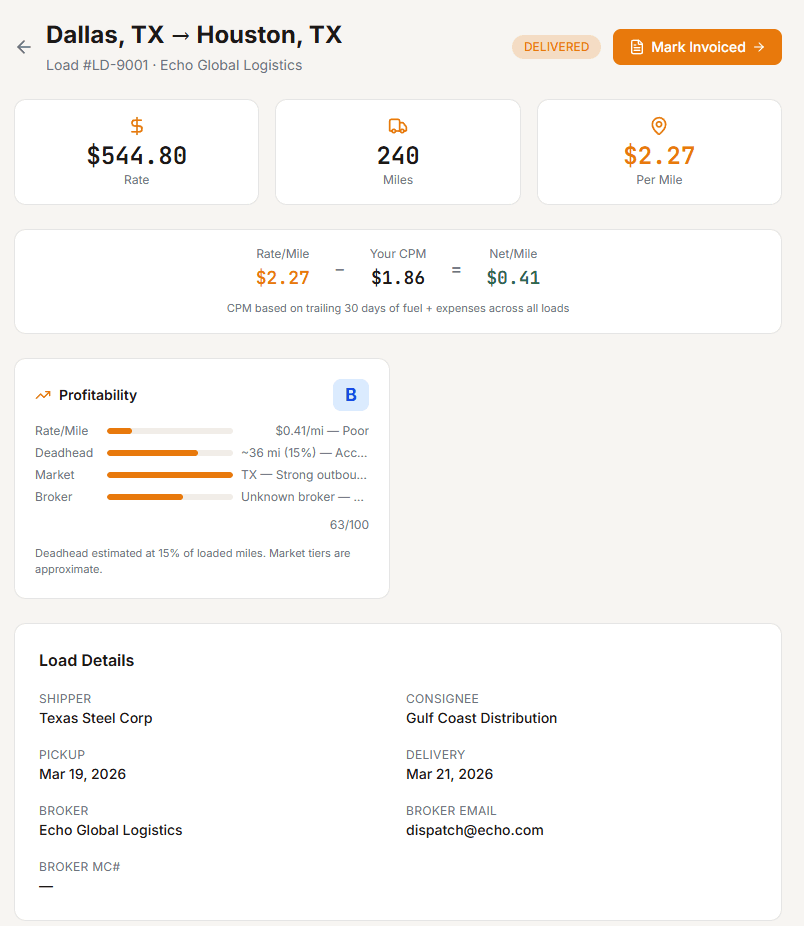
- Load profitability grading (A–F): impossible in a spreadsheet
- Compliance renewal reminders: your spreadsheet won't flag an expiring medical card; OverTheRoad.AI will
Related Guides
Want your real cost per mile in 3 minutes?
Drop a settlement or rate con — our free analyzer pulls CPM, RPM, broker margin, and IFTA prep.